
Swap flows guide
This guide documents every swap path the Aurove dapp can plan and execute today. Content is limited to behaviour implemented in the Swap UI (/#swap-interface) and routers it calls. Each flow below was checked against a running local Hardhat deployment (chain id 31337) with live contract calls where noted.
Where to swap
All swaps run through the homepage Swap card (Open swap). App nav Swap and legacy /swap redirect to the same surface.
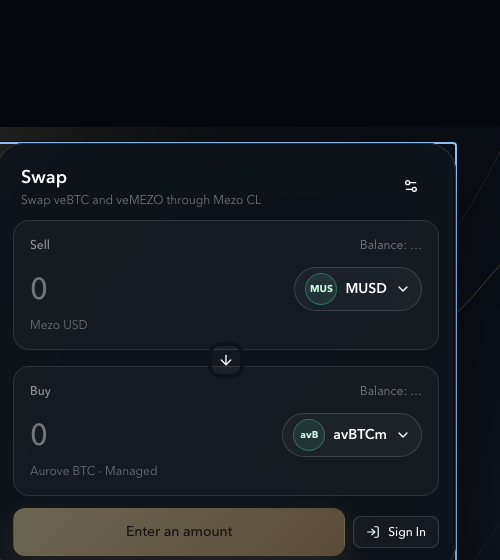
Supported asset forms
| Form | Sell side | Buy side | UI group |
|---|---|---|---|
erc20 (e.g. MUSD) | Yes | Yes | ERC-20 / Other ERC-20 |
id20 (e.g. avBTCm, avMEZOm) | Yes | Yes (preferred) | ID20 tokens |
underlying (BTC / MEZO deposit-into-managed) | Yes | No | ERC-20 tokens (special deposit label) |
tranche (Ledger ERC-1155) | Yes | No | Ledger tranches |
venft (veBTC / veMEZO position) | Yes (entire lock only) | No | veNFT positions |
Plan types (what the router does)
Flow 1 — Swap ID20 tokens (direct CL)
Status: Verified (tx) · UI-supported
Sell a liquid ID20 (for example avBTCm) for another pool token (for example MUSD) through the concentrated-liquidity router with no Aurove deposit step.
| Plan type | directClSwap → exactInputSingle / exactInput (or exact-output variants) |
|---|---|
| Router | CLSwapRouter |
| Approval | ERC-20 approve of the ID20 to CLSwapRouter |
| You send | ID20 amount (or max-in for exact-output) |
| You receive | Buy-side ERC-20 or ID20 in your wallet |
Steps
- Open Swap and connect a wallet on the active network.
- Sell → open the asset picker → under ERC-20 tokens / liquid assets choose an ID20 marked Liquid ID20 (e.g. avBTCm).
- Buy → choose MUSD or another routable ERC-20 / ID20 with a CL path.
- Enter amount (or Max). Confirm quote details (route, min received, impact).
- Approve the ID20 if prompted, then Review swap → Swap.
Edge cases
- No CL route → button shows No route available.
- High impact (≥ 5%) shows an amber warning under the quote.
- Exact-output is allowed for ID20 sells (edit the Buy amount).
Flow 2 — Swap plain ERC-20 (e.g. MUSD)
Status: Verified (tx) · UI-supported
Same directClSwap path as ID20 when both sides are fungible ERC-20s (or ID20) already listed on a registered pool route.
| Example | MUSD → avBTCm on the MUSD/avBTCm pool |
|---|---|
| Approval | ERC-20 approve of sell token to CLSwapRouter |
| Output | Buy token balance increases; sell token decreases |
Steps
- Sell → select MUSD (or other ERC-20 with a route).
- Buy → select avBTCm / avMEZOm / another ERC-20.
- Amount → Approve → Review → Swap.
Flow 3 — Swap underlying BTC / MEZO (deposit then swap)
Status: Verified (tx) · UI-supported
Selling underlying BTC or MEZO does not swap the raw token on the pool. The zap router deposits into the managed tranche, wraps to ID20, then swaps that ID20 along the CL path in one transaction.
| Plan type | auroveDepositWrapThenSwap |
|---|---|
| Router | AuroveZapRouter.zapErc20ExactInput (or zapErc20ExactOutput) |
| Approval | ERC-20 approve of BTC/MEZO to AuroveZapRouter |
| You send | Underlying BTC or MEZO |
| You receive | Buy-side token only (intermediate ID20 is not left in your wallet from this zap) |
| Side effects | Managed vault inventory increases; tranche/ID20 supply accounting updates |
Steps
- Sell → pick the underlying entry (UI name includes “deposit into …” for managed avBTCm / avMEZOm).
- Buy → MUSD or another token reachable from the managed ID20 pool path.
- Enter amount → Approve underlying → Review → Swap.
- Quote details show Before swap: Deposits and wraps into ID20 before swapping.
Edge cases
- Requires managed ID20 + pool liquidity for the path after wrap.
- Exact-output is supported for this plan type in code when quoting allows it.
Flow 4 — Swap Ledger tranches (wrap then swap)
Status: Verified (tx) · UI-supported
Sell ERC-1155 tranche shares you already hold. The zap router wraps them to the matching ID20, then swaps on CL.
| Plan type | auroveWrapThenSwap |
|---|---|
| Router | AuroveZapRouter.zapTrancheExactInput / zapTrancheExactOutput |
| Approval | ERC-1155 setApprovalForAll of Ledger → AuroveZapRouter |
| You send | Partial or full tranche balance (any amount ≤ balance) |
| You receive | Buy-side ERC-20 / ID20 |
Steps
- Hold tranche inventory (from Earn deposit). Confirm under Earn → Your Liquid Positions or Swap sell balances.
- Swap → Sell → group Ledger tranches → select managed product tranche.
- Enter a partial amount to sell only a fraction of the position.
- Approve Ledger operator if prompted → Review → Swap.
Flow 5 — Partial veNFT exit (Earn deposit + tranche swap)
Status: Verified as two composed steps (Earn deposit + Flow 4) · Not a single Swap button that sells “part of a veNFT” directly
The Swap UI only sells an entire veNFT in one zap (Flow 6). To sell a fraction of locked power you must first deposit the veNFT (or lock tokens) into Aurove, then sell tranche shares.
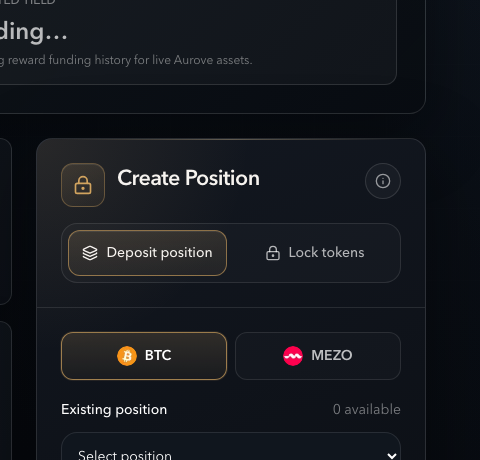
Steps
- Open Earn.
- Deposit position — select your veBTC/veMEZO NFT, approve the NFT for the Ledger, deposit; or Lock tokens — deposit BTC/MEZO ERC-20 into the managed product.
- Confirm balances under Your Liquid Positions (tranche / liquid product inventory).
- Open Swap → Sell → Ledger tranches (or liquid ID20 if you already wrapped).
- Enter the fraction to sell → Approve → Review → Swap (Flow 4 or Flow 1).
| After Earn deposit | You hold ERC-1155 tranche shares (and may wrap to ID20) |
|---|---|
| After partial swap | Tranche/ID20 balance decreases by the sold amount; buy token increases |
| Remaining position | Unsold tranche remains and continues to participate in managed yield |
Flow 6 — Swap an entire veNFT
Status: Verified (tx) · UI-supported · exact-input only
Sell a full veBTC or veMEZO NFT in one transaction: deposit into the managed tranche, wrap, and swap to the buy token via the zap router.
| Plan type | auroveVeNftThenSwap |
|---|---|
| Router | AuroveZapRouter.zapVeNftExactInput |
| Approval | ERC-721 approve of the veNFT to AuroveZapRouter |
| Sell amount | Fixed to the NFT lock amount (inputs are read-only) |
| Swap type | exactInput only — exact-output is rejected in the planner |
| You receive | Buy-side ERC-20 / ID20; the veNFT leaves your wallet |
Steps
- Hold a veBTC or veMEZO in the connected wallet on the active chain.
- Swap → Sell → group veNFT positions → select
veBTC #…/veMEZO #…. - Amount fills automatically from lock size; Buy amount is also read-only for this flow.
- Select buy token with a valid route from the managed ID20.
- Approve the NFT → Review → Swap.
Edge cases
- Empty veNFT list if the wallet has no positions or portfolio read fails.
- Cannot reverse a veNFT sell into “buy veNFT” — buy side is fungible only.
- Cannot sell “half” of a veNFT in one swap; use Flow 5 for partial exit.
Approvals cheat sheet
| Sell form | Token | Spender / operator | Kind |
|---|---|---|---|
| erc20 / id20 | Sell ERC-20 | CLSwapRouter | ERC-20 allowance |
| underlying | BTC / MEZO | AuroveZapRouter | ERC-20 allowance |
| tranche | Ledger | AuroveZapRouter | ERC-1155 setApprovalForAll |
| venft | veBTC / veMEZO | AuroveZapRouter | ERC-721 approve (tokenId) |
Common UI states
| Button / panel | Meaning |
|---|---|
| Connect Wallet | No wallet connected |
| Loading markets… / Unable to load markets | Registry fetch |
| No route available / Insufficient liquidity | No CL path or empty pool path |
| Approve … | Missing allowance / operator approval |
| Review swap | Ready to open confirmation dialog |
| Quote details → Before swap | Zap plan will deposit/wrap before the CL swap |
Pools powering routes (configured)
- MUSD / avBTCm — primary stable ↔ liquid BTC path
- avBTCm / avMEZOm — liquid BTC ↔ liquid MEZO path
Multi-hop routes up to the configured max hops (default 3) when a direct pool is missing. See also Providing liquidity.
Limitations (do not assume)
- Swaps use concentrated-liquidity AMM routes only (not limit orders).
- No buy-side veNFT or tranche purchases in Swap.
- Partial veNFT amount is not a native swap control; use Earn deposit + tranche sell.
- veNFT sells are exact-input only (planner rejects exact-output).
- Academy points may accrue for qualifying swaps through supported pools; that is separate from swap execution (see Points).
Related
- Swap overview — UI controls reference
- Fractions
- Managed yield / Tranches
- ID20
- Contracts
- Connect wallet on the correct chain.
- Pick Sell form (ID20, ERC-20, underlying, tranche, or entire veNFT).
- Pick Buy ID20/ERC-20 with a live quote.
- Approve the correct token kind, then Review → Swap.
- For partial ve exit: Earn deposit first, then sell tranche amount.